Best Stock Screener APIs in 2026: Which Data Providers Actually Have One
Most stock data APIs do not have a screener endpoint. Of the providers builders reach for in 2026, five return a filtered list of tickers from criteria, two are unofficial wrappers, and the rest make you pull the universe and filter it yourself. Here is which is which.

If you need a stock screener you can call from code in 2026, the short answer is that most stock data APIs do not have one. Of the providers builders reach for, EODHD, Intrinio, Benzinga, Alpaca and SentiSense document an endpoint that takes criteria and returns the matching tickers. Finviz, TradingView and stockanalysis.com have excellent web screeners and no official API. Finnhub, Twelve Data, Alpha Vantage and Tiingo have no screener at all, so a screen means downloading the universe and filtering it yourself. The rest of this page is the evidence, including where each of the others beats us.
Full disclosure up front: SentiSense is our product. Read our row with that in mind. Pricing moves too often to print, so every plan note below is qualitative and the current numbers are one click away on each vendor's site.
What counts as a screener API?
One call in, a list of tickers out. The request carries the criteria (a market cap floor, a return window, a dividend yield, a rating), and the response is the subset of the universe that passes. That is a different thing from a fundamentals or quote endpoint, which answers questions about a ticker you have already named. Most APIs have the second kind. The screener is rarer because it needs the provider to hold the whole universe pre-computed on every filterable field and to serve the filter as a query, and that is real infrastructure.
Three things separate the ones that exist:
- The field catalog. Fundamentals only, or technicals and analyst consensus too? Anything the provider computes itself?
- The row cap. A screener that stops at 50 rows is a "top movers" list wearing a screener's name.
- The plan. Several providers document a screener and then gate it to a tier above the one most builders start on.
Which providers have a real screener endpoint?
| Screener endpoint | Filter dimensions | Row cap | Plan | |
|---|---|---|---|---|
| EODHD | Yes | Exchange, sector, industry, market cap, EPS, dividend yield, 1-day and 5-day return, volume, a few canned signals such as new highs and lows | 500 per call, about 1,000 reachable through paging | Paid packages only; each call also costs several quota credits |
| Intrinio | Yes | Valuation, profitability, size, price and volume, with a condition syntax you compose yourself | Very high (page sizes in the tens of thousands) | Institutional pricing; which tier unlocks it is not published on the docs page |
| Benzinga | Yes, as a movers endpoint with a screener query | Price, percent change, volume, average volume, market cap, sector, float, short interest | Parameterized, no published maximum | Enterprise, negotiated; docs sit behind a keyed portal |
| Alpaca | Yes, movers and most-actives | Direction and count, not custom criteria | Small, list-shaped | Part of the market data API; plan gating not published on the screener page |
| SentiSense | Yes, stocks and ETFs | SentiSense Score windows and trend, SentiSense Rating letter, attention share and velocity, analyst buy ratio, target upside, rating momentum and count, moving-average distance and cross state, 1-month to 1-year returns, 30-day volatility, market cap, price, volume | 500 per call | Free key, rate limited per minute; higher limit on PRO |
Two of the five are complete screeners in the sense builders mean: EODHD and Intrinio let you compose arbitrary criteria over fundamentals. Benzinga's is a scanner tuned for intraday movers. Alpaca's is a movers list with a count. Ours has no fundamentals fields at all, which we come back to below.
Which popular screeners have no API?
Finviz. The web screener has around seventy criteria across descriptive, fundamental and technical fields and is the one many traders learned on. Elite adds real-time data and larger exports. There is no official API; the Python packages that wrap it are scrapers maintained by third parties.
TradingView. The screener is enormous, with thousands of fields across stocks, crypto, forex and futures. There is no official API. The tradingview-screener and tvscreener packages on PyPI and GitHub reverse-engineer an internal endpoint and say so in their own READMEs, and TradingView's terms of use prohibit automated data collection. Those packages hold two of the top five search results for "stock screener API" today, which says something about the gap this page is about.
stockanalysis.com. A very good free research site with a wide screener and export to CSV, Excel and Sheets on the paid plan. The vendor's own FAQ says there is no API, MCP server or other programmatic interface. We wrote about its internal chart endpoint separately, because people search for it by URL.
Which data APIs make you build the screener yourself?
Finnhub has no screener category anywhere in its documentation index. Twelve Data ships a fixed gainers-and-losers list with no custom filters. Alpha Vantage offers a listing-status directory, which is every active and delisted symbol as a CSV, not a filter. Tiingo is per-ticker only: end-of-day prices, fundamentals, news, plus a symbol search. All four are good at what they do, and with any of them a screen means pulling fundamentals for the whole universe into your own store and querying that, which is a weekend of plumbing and a recurring bill in calls.
yfinance deserves its own line. Yahoo has no official finance API, but the library's screener module does return filtered ticker lists from a broad set of criteria: region, sector, price and change, 52-week distance, volume, beta, valuation and statement lines. It is free, it is unofficial, and it runs on endpoints that can change without notice. Fine for a notebook, not a contract.
Where does SentiSense win, and where does it not?
Our screener runs over roughly a thousand tracked US stocks and a set of ETFs. The stock catalog has 33 fields in five groups: Score, attention, price and size, analyst, technical. The ETF catalog has 16, including a Score computed from the fund's own holdings. Every field name, unit and operator is served by the fields endpoint, and 28 curated screens ship as stored plans you can run by name. Filters are ANDed, sorting is on any field, the cap is 500 rows a call, and the snapshot behind it refreshes every twenty minutes.
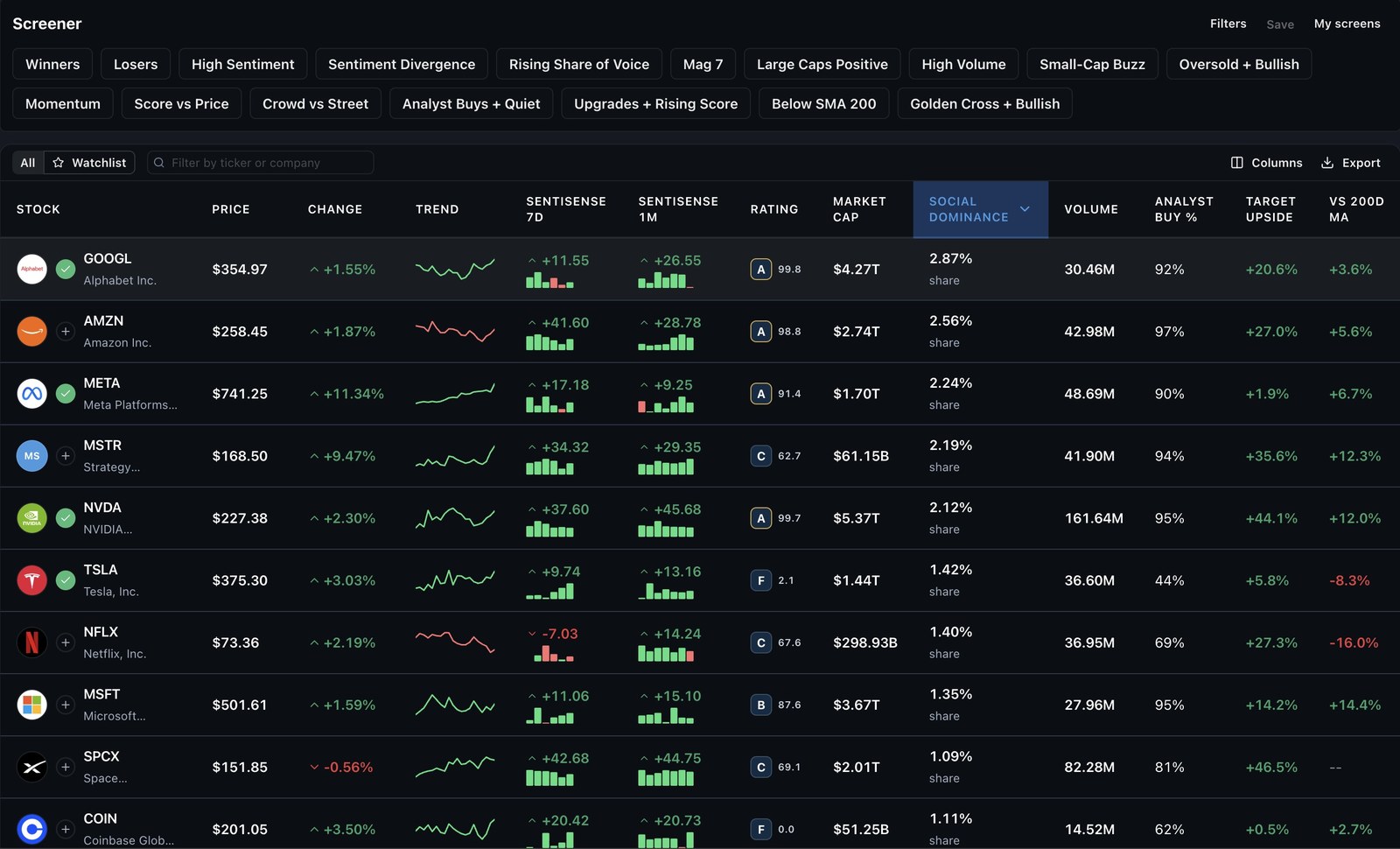
The thing no other row on this page has is the cross between our own signal and the street's. "Analyst buy ratio under 30 percent, at least five analysts, SentiSense Score above 5" is a single request:
curl -X POST https://app.sentisense.ai/api/v1/screener/execute \
  -H "X-SentiSense-API-Key: ss_live_YOUR_KEY" \
  -H "Content-Type: application/json" \
  -d '{
    "plan": {
      "filters": [
        { "fieldName": "SENTI_SCORE_7D", "op": "GTE", "value": 5 },
        { "fieldName": "ANALYST_BUY_RATIO_PCT", "op": "LTE", "value": 30 },
        { "fieldName": "ANALYST_COUNT", "op": "GTE", "value": 5 }
      ],
      "sort": { "fieldName": "SENTI_SCORE_7D", "dir": "DESC" }
    },
    "limit": 25
  }'
Where the others win, plainly:
- No fundamentals fields. You cannot screen on P/E, revenue growth, margins or dividend yield here today. EODHD, Intrinio and yfinance all can. If your screen starts from valuation, start there.
- US only, about a thousand names. EODHD and TradingView cover global exchanges; Finviz covers the full US list.
- Twenty-minute snapshot, daily Score windows. Benzinga's scanner is built for intraday. Ours is not a real-time feed and should not be polled like one.
Which screener API is best for AI agents?
A screener is the endpoint an agent gets the most out of, because it collapses "which large caps are below their 200-day average with rising analyst upside" into one call instead of a thousand. What the agent needs is a filter catalog it can read as data, a fixed response shape, a row cap it can plan around, and a way to run the screen without composing JSON by hand. EODHD and Intrinio publish the first three. TradingView's wrappers publish the first two and inherit the terms problem.
The same 28 screens run from whichever surface the agent already has, so nothing below is a port of something else.
The CLI. Whatever the agent runs on, if it can open a shell it can screen. npx -y sentisense screen --list prints the curated screens, --fields prints every filterable field with its operators, and either of these runs one:
npx -y sentisense screen --screen crowd-vs-street --limit 5
npx -y sentisense screen --filter SENTI_SCORE_7D:GTE:13 --filter ANALYST_BUY_RATIO_PCT:LTE:30 --limit 5 --json
Piped output is plain label-and-value text an agent can read whole. --json returns the exact API response. Exit codes are stable (0 ok, 2 usage, 3 auth, 4 not found, 5 rate limited, 6 network), so a script branches on the number instead of parsing an error string.
The MCP connector. Claude, ChatGPT, Cursor and any MCP client get a screen_stocks tool at app.sentisense.ai/mcp: same plans, same curated screens by name.
The skill. For agents that read skills, the same catalog and curated screens ship as stock-screener on ClawHub, or npx skills add SentiSenseApp/skills -s stock-screener on Claude Code and Codex. It turns a plain-language ask such as "find oversold stocks with bullish sentiment" into a valid plan, so the agent never guesses a field name.
The REST endpoint above, for everything else, with the fields endpoint serving the catalog as data.
How to choose
- Fundamentals first? EODHD or Intrinio if you are paying; yfinance if you are experimenting.
- Intraday movers? Benzinga, or Alpaca's movers list if you are already on Alpaca.
- A signal the others do not have, or an agent doing the screening? Ours is the only screener on this page that filters on a model-scored conviction signal and attention, crossed with analyst consensus and technicals, and the only one an agent can install as a skill or run as a single CLI command.
- A web screener you love with no API? Finviz, TradingView and stockanalysis.com are worth every minute in a browser. Budget the export step, and read the terms before automating it.
Every provider with a documented screener has a free or trial way in. Run the same screen on two of them and compare the lists; the differences in coverage and freshness show up in the first hundred rows.
Want to run one now? Get a free SentiSense API key → and call the screener with the request above.