
How to Add Live Market Data to Meta Muse With a Custom Connector
Give Meta's Muse agent live stock market data in about five minutes: one free API key, one pasted prompt, and Muse builds a custom connector that can quote a stock, read its sentiment, check who is buying and see who reports this week.

To add live stock market data to Meta Muse, get a free SentiSense API key, then ask Muse to build a custom connector from the SentiSense connector brief. Muse reads the brief, stores your key in its Secure Credentials Store and can then quote a stock, read its sentiment, pull analyst targets, check insider and congressional trades and look up the earnings calendar in the same chat where it books your dinner.
What is a Muse custom connector?
Muse is the personal AI agent Meta launched on September 8, 2026, on the web, iOS, Android and WhatsApp. It gets its abilities from Connectors: Gmail, Google Calendar, Spotify, OpenTable, Apple Health and the rest of the listed set. For a service that is not on the list, Meta's help pages describe a custom connector: you ask Muse to create one, it walks you through gathering the service's API details and it keeps the credentials in its Secure Credentials Store, where the model uses them without seeing them. Meta does not review custom connectors, so this path fits a service you already trust with a key that only reads data.
SentiSense is that kind of service. Every endpoint is read-only, the key is free, and the API has no way to place an order.
How do you connect Muse to SentiSense?
1. Get a free key. Create one at sentisense.ai/get-api-key. No card. Keep the page open; you will paste the key into Muse in step 3.
2. Paste this into Muse. Open a new chat and send:
Build a custom connector for SentiSense so you can look up live US stock market data for me. The connector brief is at https://sentisense.ai/connectors/muse.md. Read it first. The base URL is https://app.sentisense.ai and every request needs the header X-SentiSense-API-Key set to the SENTISENSE_API_KEY secret I am about to give you. The API is read-only. When the connector works, tell me today's Market Mood reading and how NVDA is doing.
3. Hand over the key when asked. Muse keeps it in its Secure Credentials Store and uses it on each request without the model seeing it.
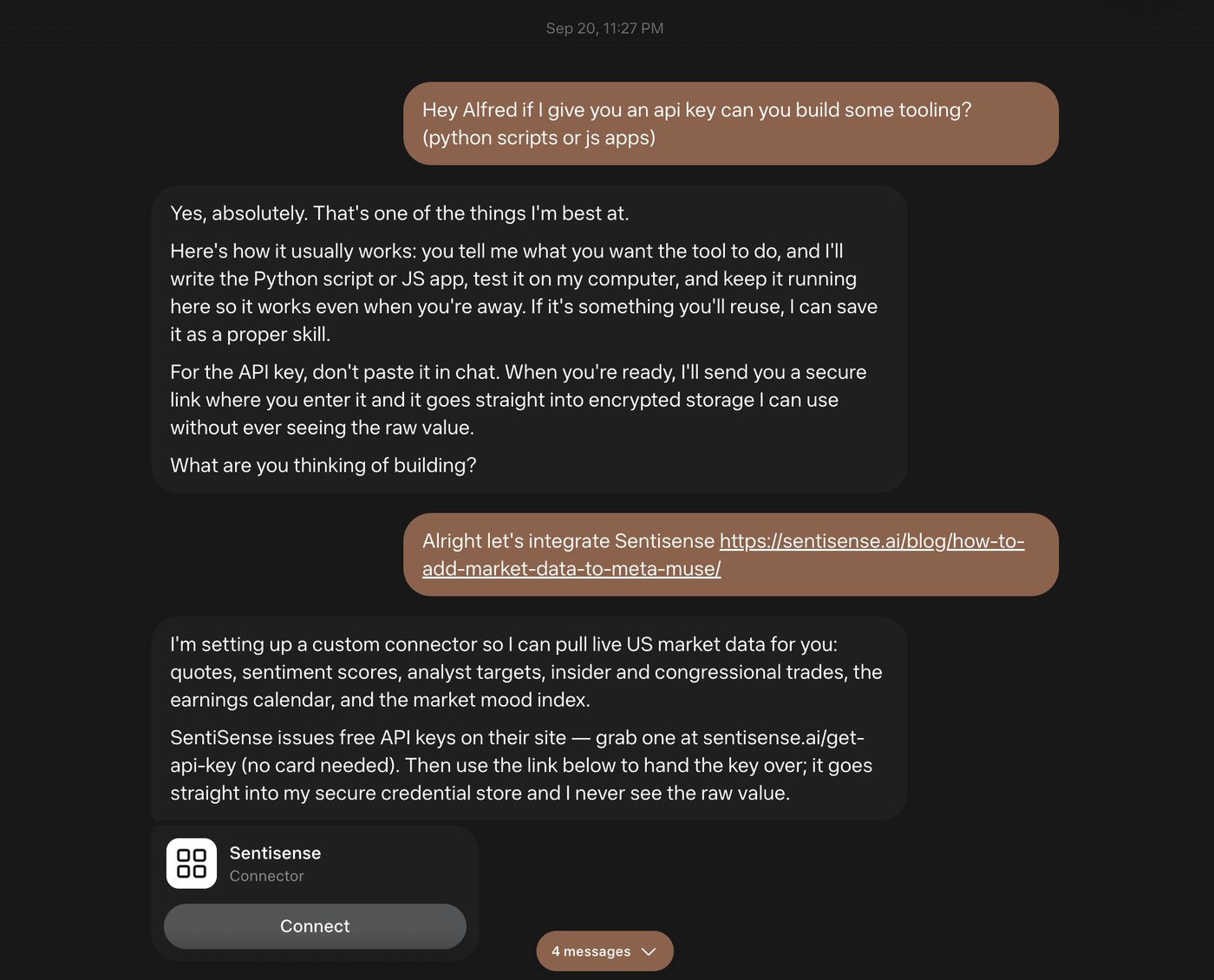
This is what that exchange looks like. Given the link to this post, Muse read the brief, named what it would pull (quotes, sentiment scores, analyst targets, insider and congressional trades, the earnings calendar, the market mood index), pointed at the free key, and in its own words the key "goes straight into my secure credential store and I never see the raw value."
4. Ask a market question. Muse now has the tools the brief describes and picks the right one for the question.
The brief is a short markdown file: base URL, auth header, nine endpoints with their response fields, three worked recipes and the rules the connector follows. Muse can build a connector from a full OpenAPI document, but a brief this size is what it reads well, and it is the same file we hand to other agent runtimes.
What can Muse do with it?
The prompts that work well on the first day, and what comes back:
- "How is NVDA doing?" The delayed quote with the day's change, the sentiment direction with the 30-day SentiSense Score and the two stories driving it, then the analyst target band and the upside to the current price, each with its timestamp.
- "What is the market doing this week?" The Market Mood reading, the top market insights and the names reporting this week with their before-open or after-close timing.
- "Anything unusual around AAPL?" Dated insider transactions with the person and their role, any congressional disclosures on the ticker, and whether sentiment moved with them.
- "Screen for stocks where the crowd is bullish and the street is not." Muse runs one of the curated screens and returns the matched names with their scores and analyst buy ratios.
Every answer carries the date or timestamp of the number behind it. Quotes are 15-minute delayed; sentiment refreshes several times a day; analyst data roughly daily; filings as they land.
Where does this fit with the other agents?
The same data is available to Claude, ChatGPT and Grok through the hosted MCP connector, and to Codex, Claude Code, Cursor and OpenClaw through the agent skills. Muse is the first of the personal agents, the kind that lives next to your calendar and inbox rather than in a terminal, and the custom connector is how it joins the list. One key works everywhere.
Questions people ask
Is there an official SentiSense connector in Muse? Not yet in Muse's listed connectors. The custom connector path above works today and needs nothing from Meta.
Does Muse see my API key? Per Meta's help pages, credentials go into Muse's Secure Credentials Store and are substituted into requests at the network boundary, so the model works with a placeholder rather than the key itself. Hand it over when Muse asks for it.
Do I need a paid plan? No. A free SentiSense key covers everything in this guide, with a monthly request allowance and a per-minute rate limit. Some lists come back as a preview of the top rows on the free plan; paid plans return the full lists. Muse itself has a free tier.
Can Muse trade with this? No. The SentiSense API is read-only: there is no order, trade or purchase endpoint, and the connector brief says so. Muse can research a stock with it; it cannot act on a brokerage account through it.