How to Build a Portfolio Dashboard in Claude With the SentiSense Connector
One sentence to Claude and the SentiSense connector builds a dashboard that tracks your holdings with the research context around them: the SentiSense Rating, analyst targets, insider and congressional trades, 13F holders and the stories moving each stock. How we built one for MCD and TTWO on October 11, 2026, and what it cannot chart yet.

With one sentence to Claude and the SentiSense connector, you get a dashboard that tracks your holdings with the research context around them, not just the price.
Most portfolio trackers stop at price and P&L. The questions that matter sit elsewhere: are insiders selling, is Congress trading it, are funds adding, where do analysts put the stock, and what story is moving it. Here is how we built a dashboard for two holdings, McDonald's (MCD) and Take-Two (TTWO), that puts all of that on one page, and what it showed on Sunday, October 11, 2026.
What you need
Two things: Claude, and the SentiSense connector added to it. SentiSense is listed in Claude's connector directory, and the steps are in Stock Market Data in Claude. The connector gives Claude eleven read-only research tools, including the stock snapshot, the SentiSense Rating, analyst consensus, earnings dates, insider and congressional trades, 13F holders and curated news stories. You write no code.
Step 1: Ask for it in one sentence
Open a new dashboard in Claude and describe what you want. Our whole prompt was:
Use the SentiSense connector to build me a dashboard that tracks my portfolio (MCD, TTWO).
Claude takes it from there. It calls each SentiSense tool for every ticker, checks what comes back, designs the layout and wires each panel to its source. In our build that was nine tools per ticker, eighteen calls in all. Swap in your own tickers; the approach is the same for two holdings or ten.
Step 2: Read the page Claude builds
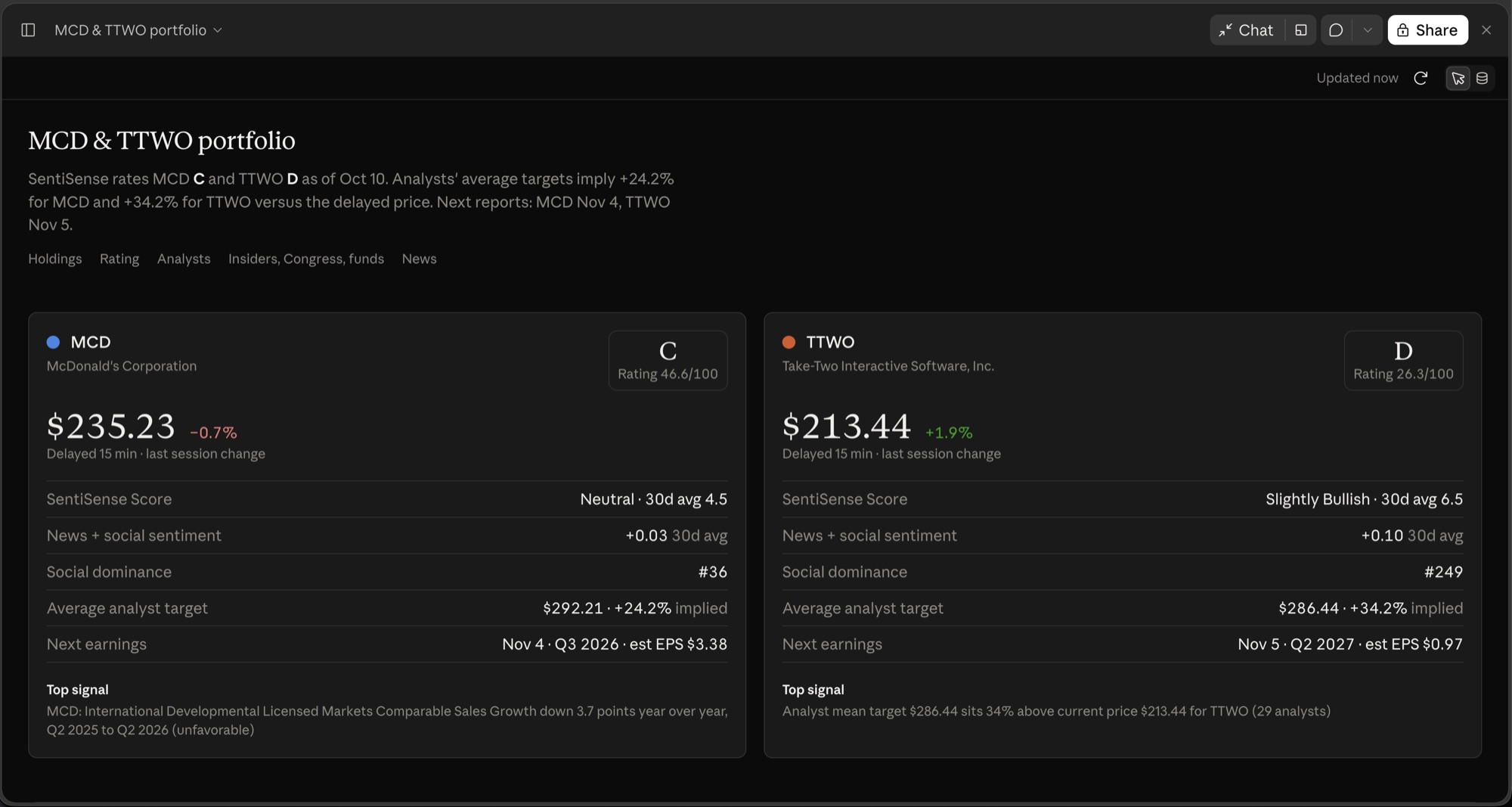
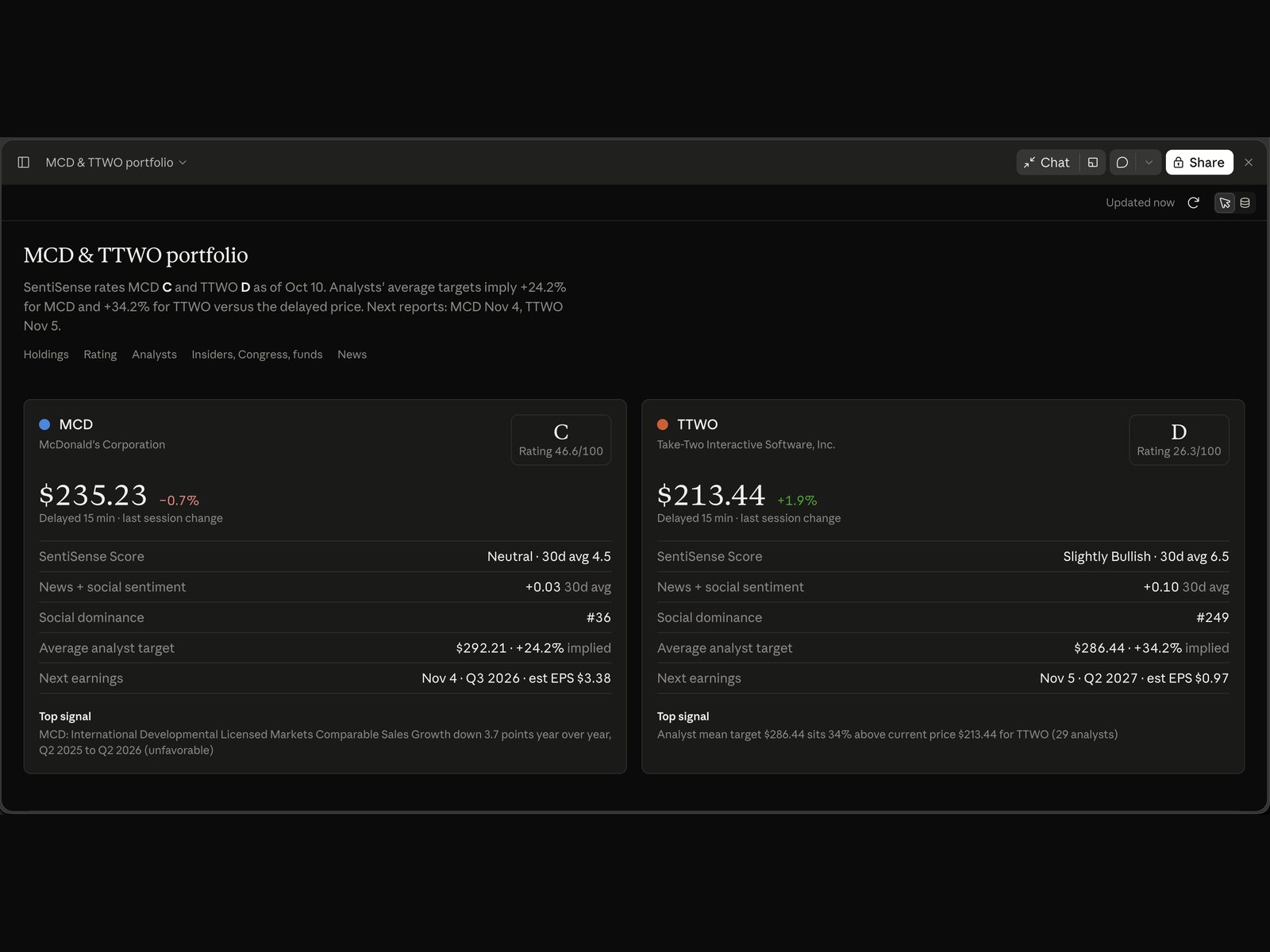
The Holdings section on October 11, 2026. A Claude artifact built with the SentiSense connector.
The dashboard opens with a one-line takeaway: each holding's SentiSense Rating, how far the average analyst target sits from the price, and the next earnings date. On October 11 it read: SentiSense rates MCD C and TTWO D as of October 10, analysts' average targets imply +24.2% for MCD and +34.2% for TTWO versus the delayed price, next reports November 4 and November 5. Below it are five sections:
- Holdings. One card per stock with the delayed price and last-session change, the SentiSense Rating (A to F) with its 0 to 100 score, the SentiSense Score, 30-day news and social sentiment, social dominance rank, the average analyst target and the next earnings date with the consensus EPS. MCD: $235.23, Rating C (46.6), Score Neutral with a 30-day average of 4.5, next report Wednesday, November 4, consensus EPS $3.38. TTWO: $213.44, Rating D (26.3), Score Slightly Bullish with a 30-day average of 6.5, next report Thursday, November 5, consensus EPS $0.97. Each card ends with the top AI signal on the name.
- Rating breakdown. One chart compares the holdings across the seven dimensions behind the Rating, each as a percentile among the 1,177 stocks rated that day. You can see at a glance why one stock rates a C and the other a D: MCD sits at the 94th percentile on options positioning and the 80th on fundamentals, with technicals at the 28th; TTWO is at the 86th on analysts and the 78th on crowd sentiment, with fundamentals at the 12th.
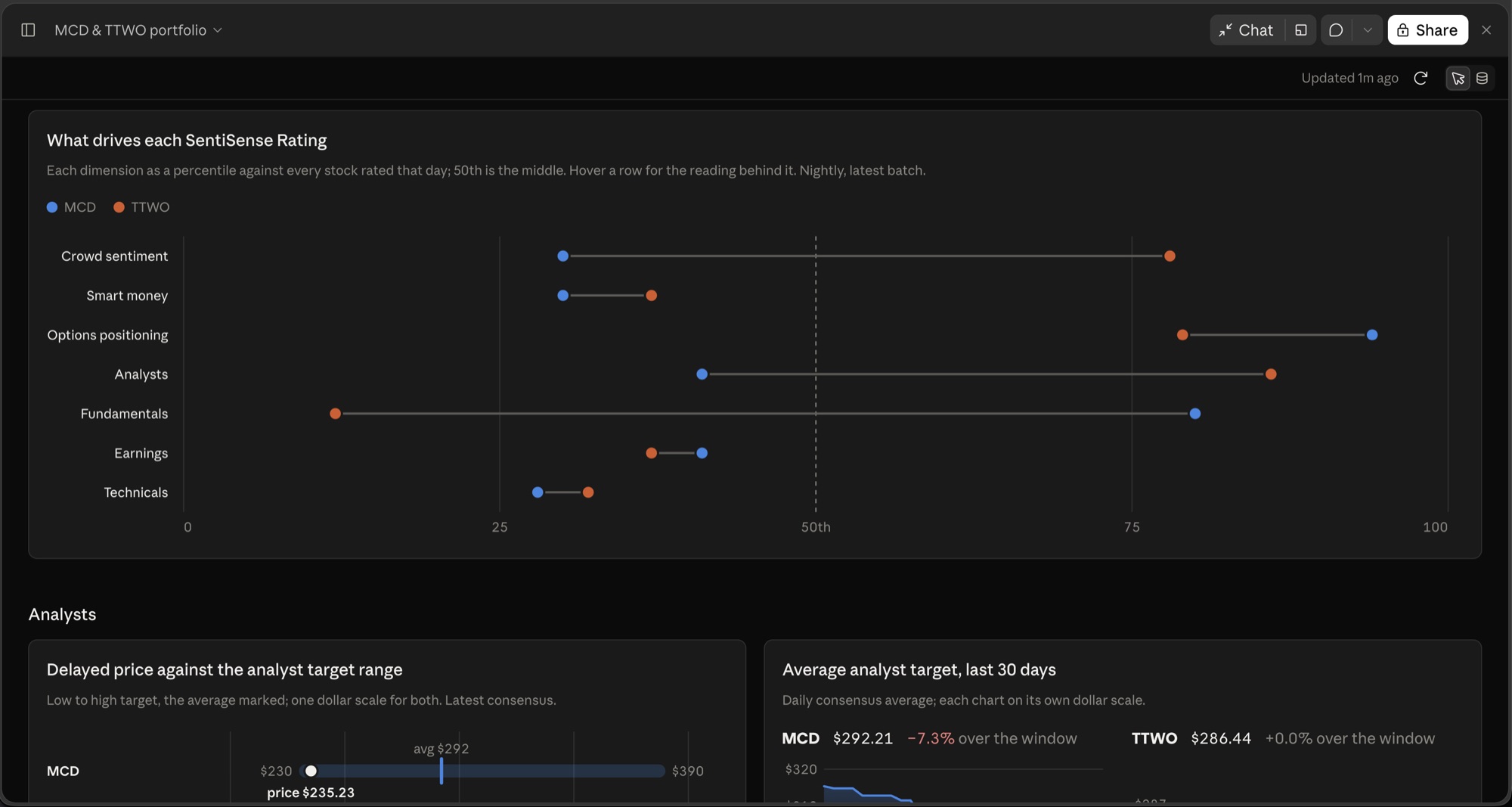
The Rating breakdown on October 11, 2026. A Claude artifact built with the SentiSense connector.
- Analysts. Each stock's price sits inside its low-to-high target range, and a 30-day line shows whether the average target is rising or falling. MCD's range ran from $230 to $390 with the average at $292, and that average fell 7.3% over the window; TTWO's ran from $170 to $368, and its average did not move.
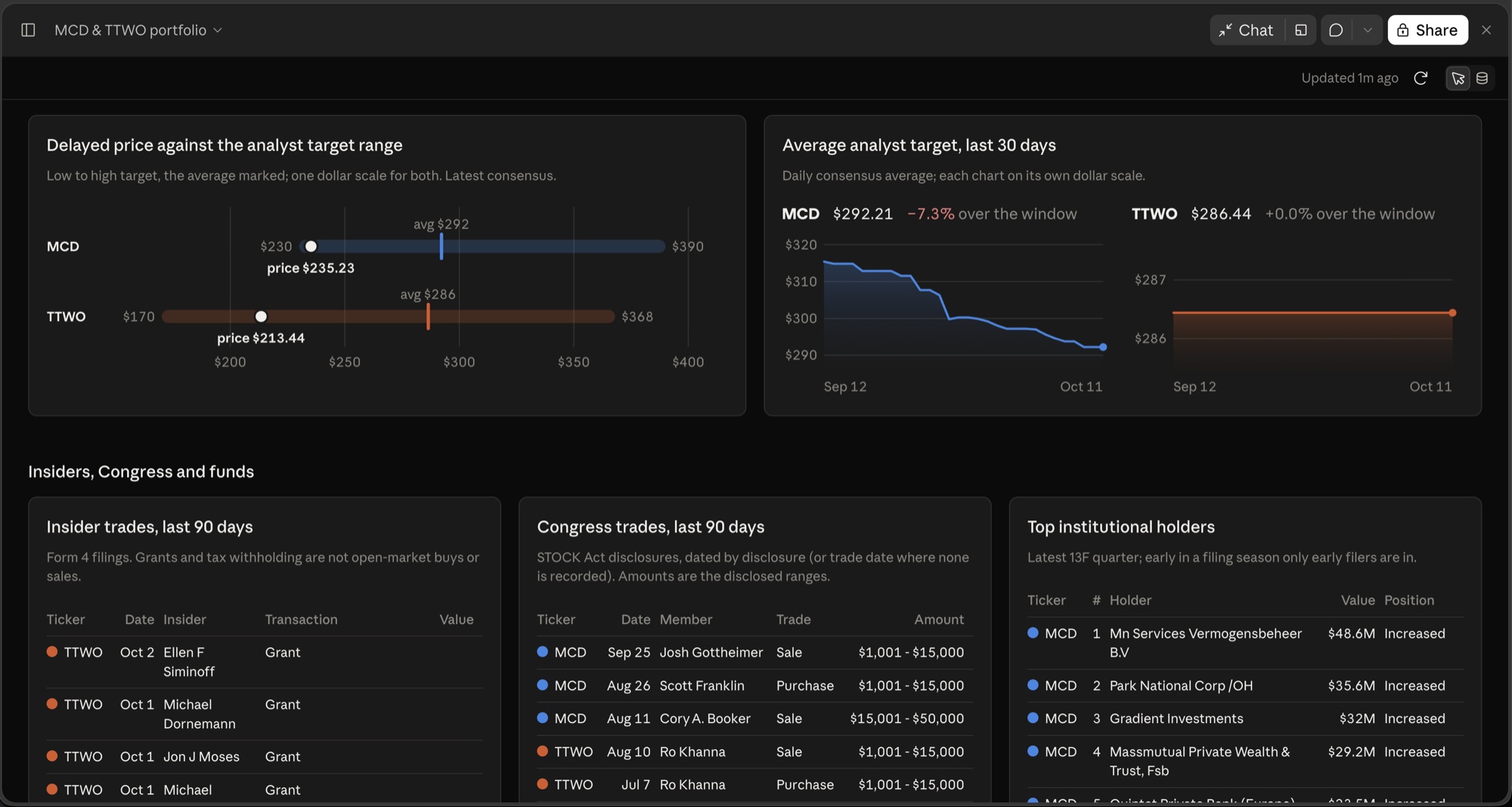
The Analysts section and the top of the filings tables on October 11, 2026. A Claude artifact built with the SentiSense connector.
- Insiders, Congress and funds. Form 4 insider trades and congressional trades over 90 days, plus the largest 13F holders and whether they added or trimmed. TTWO's table carried twenty insider sales worth $12.2 million from seven filers, ten of them under 10b5-1 plans, and no purchases; MCD's had no open-market sales or purchases, only grants and tax withholding, which the table labels as such. Congress: four MCD sales and one purchase disclosed between July 30 and September 25, and for TTWO a Ro Khanna purchase disclosed July 7 and a sale August 10, all in the $1,001 to $50,000 bands. The 13F panel says what it is: early in a filing season, only the early filers are in.
- News. SentiSense's curated story clusters from the last 30 days, each with its sentiment and number of sources. For MCD the lead story was the Financial Times report on October 8 that Starbucks explored a Chipotle takeover; for TTWO, Google's Playground launch with Unity on October 7.
That last pair of sections is the full research context: who is buying and selling, and why the stock is in the news.
Step 3: Let it stay current
Nothing on the page is a pasted snapshot. In our build, every panel is a live SentiSense query that runs again whenever the dashboard is opened or refreshed. Open it next week and the ratings, trades and stories are next week's. This is how Claude's live artifacts work: Anthropic's artifacts guide describes a dashboard that calls MCP connectors each time someone views it, through the viewing account's own connections, with viewers approving access before the first call.
You can also check any number. The Sources panel in our dashboard shows which SentiSense tool and arguments produced each figure, along with the rows that came back, and those rows download as CSV.
One thing to know before sharing: each viewer's dashboard runs on their own SentiSense connection, so someone on a different plan sees a different level of detail. We built ours on a PRO account. On a free account the analyst target band is there but the buy, hold and sell counts are not; the insider, congressional and 13F tables show the top rows rather than the deeper lists; the story list is complete, and opening a full story is 20 reads a month. A free account also has 1,000 connector calls a month, shared with the REST API, and this dashboard spends eighteen per open.
Step 4: Make it yours
Keep talking to Claude to change it. Some follow-ups worth trying:
- "Add NVDA and AAPL."
- "Add an options panel with IV rank and put/call ratio for each holding." On October 11, MCD's would have read IV rank 66 and a put/call volume ratio of 0.37, the 8th percentile of its own year; the 25-delta skew and open-interest walls are PRO.
- "Show market-wide Market Mood at the top."
- "Highlight any insider sale over $1M in red."
A few honest limits. The dashboard does not chart price history or your P&L: the connector has no price-history tool, and the dashboard does not know your share counts or cost basis. Each ticker adds nine queries, so a long watchlist loads slower and spends quota faster. Prices are delayed 15 minutes, options data is end of day, the Rating is recomputed nightly and sentiment reflects the latest analytical batch rather than the current tick. The connector covers the most-watched US stocks, not every ticker. Everything on the page is research context, not investment advice. A dashboard that has to run outside Claude, on a schedule, is the API route: MCP connector or API key? walks through that choice.
Try it
One sentence gets you a research dashboard for your own holdings, live and sourced. Add the SentiSense connector to Claude, name your tickers, and see what the smart money and the news say about what you own.
Connect SentiSense in Claude →
Figures and captures are as the SentiSense connector returned them on October 11, 2026, from a PRO account; the SentiSense Rating and Score are from the October 10 batch. This article is educational and is not investment advice.