Parts of an AI Agent: Key Components Explained With a Diagram
The parts of an AI agent, explained for people who use ChatGPT or Claude every day: the model, instructions, context, tools, connectors (MCP), skills, memory and the loop, each with a plain definition, a real-life example and a small diagram, with stock research as the running example. Plus why the model you pick and where the agent runs change what it can do.

If you use ChatGPT or Claude for everyday things, a line of code for your website, a tighter script for a reel, a letter you did not want to write, this page is for you. You have been using a model all along without needing the word. An agent is what you get when that model is allowed to do more than answer: open a file, visit a site, look something up, check its own work and go again.
By the end you will be able to name the parts of any AI agent, and you will know two things most people never try: which model your subscription already gives you, and when an agent on your own computer can do a job that one in the cloud cannot. The running example is a question you might actually ask: what do analysts and the crowd think of Nvidia right now?
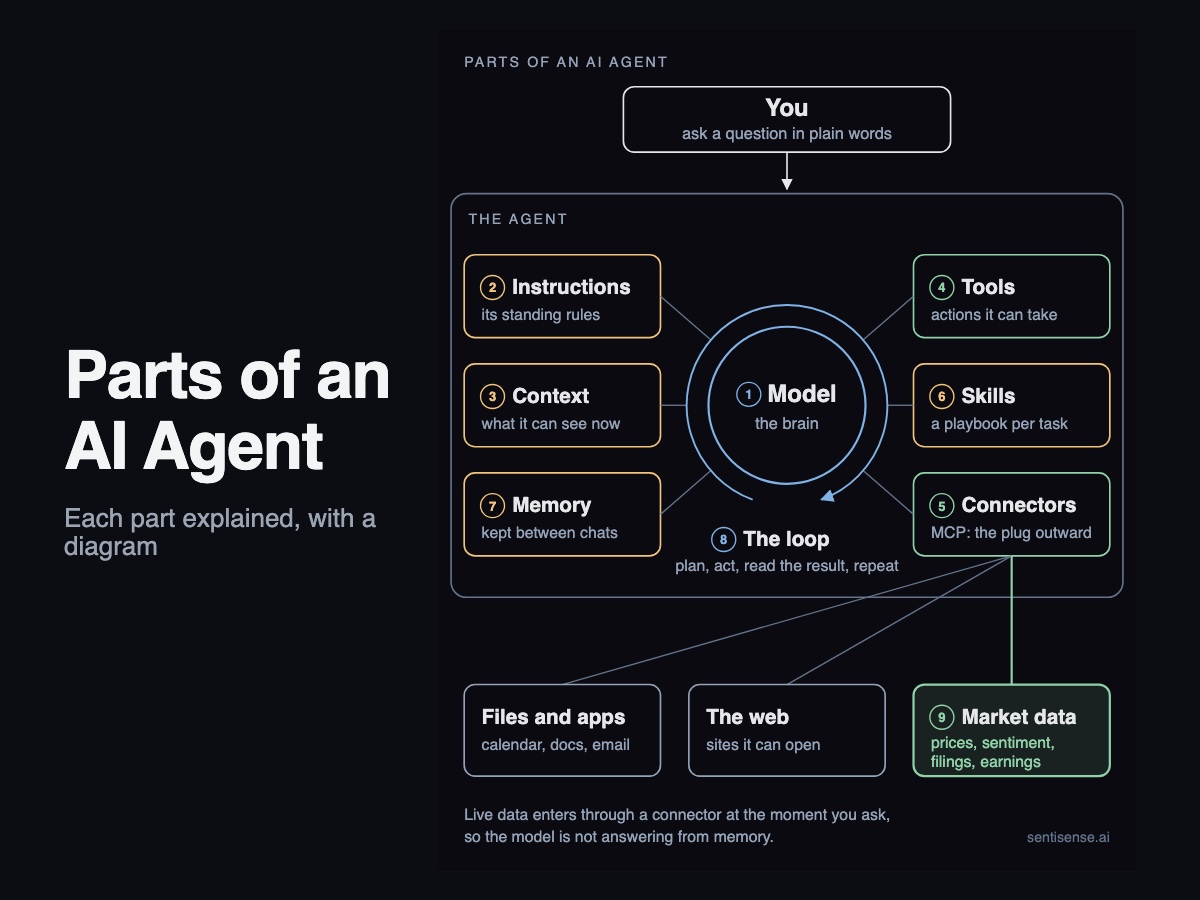
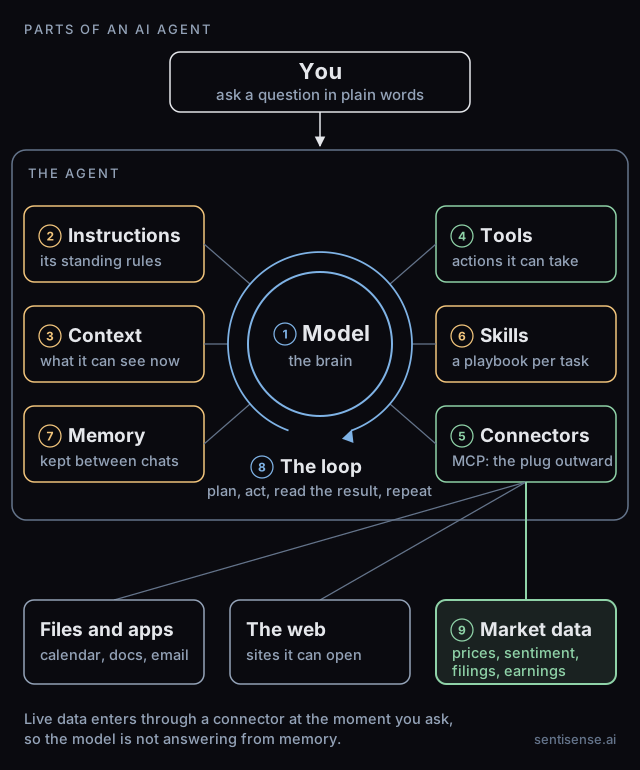
An AI agent has nine working parts: a model (the brain), instructions, context (what it can see right now), tools, connectors, skills, memory, a loop that lets it take several steps before it answers, and the outside data, such as market data, that enters through the connectors and tools.
What are the parts of an AI agent?
Nine parts, numbered to match the diagram: a plain definition, one line on what it looks like in real life, and a small picture each.
1. The model (the brain)
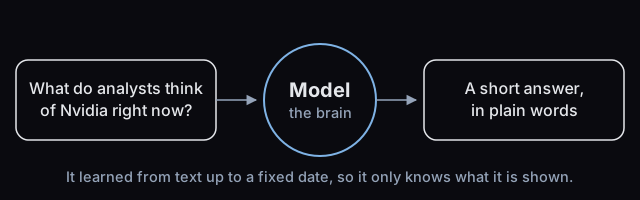
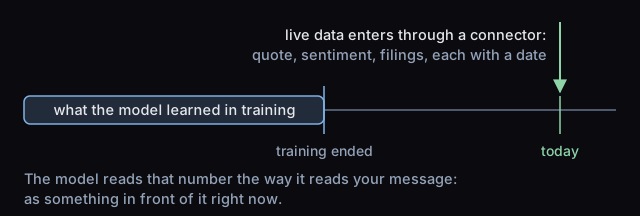
The program that reads your words and writes the reply. Everything else on the diagram exists to feed it or to act on what it writes. It learned about the world from text up to a fixed date, so on its own it cannot know today's price of anything; it can only reason about what it is shown.
In real life: when you pick Opus or GPT-6 from a menu, you are choosing the brain. The rest of the agent stays the same.
2. Instructions
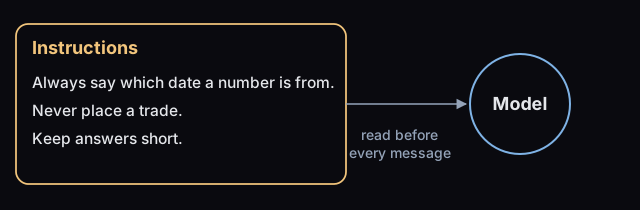
Standing rules the model reads before it reads your message: who it works for, what it may and may not do, how to answer. In a chat app the vendor writes most of them and your settings add a few. In a self-hosted agent, you write them.
In real life: "Always say which date a number is from" is an instruction. So is "never place a trade."
3. Context (what it can see right now)
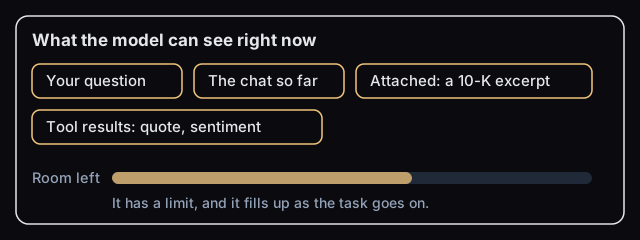
Everything in front of the model at this moment: your question, the chat so far, the file you attached, the results of the tools it has called. It has a limit, so an agent that has just read fifty pages of filings has less room left for the rest of the job.
In real life: when an agent "forgets" what you said twenty messages ago, the context ran out. Memory is a different part.
4. Tools
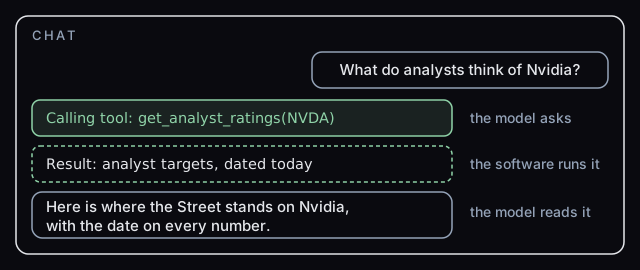
Actions the model is allowed to take: search the web, read a file, run a calculation, call a data source. The model does not do the action itself. It writes a request, the software around it runs the request, and the result lands back in the context for the model to read.
In real life: "get the analyst targets for NVDA" is one tool call. In most apps you can watch it happen in the chat.
5. Connectors (MCP)
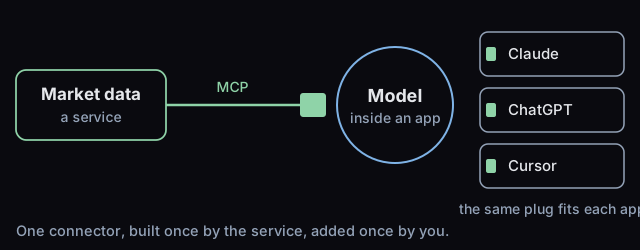
A connector is a tool that reaches an outside service: your calendar, a database, a market data feed. MCP, the Model Context Protocol, is the open standard that lets one connector work in many apps, the way one USB-C cable fits many devices. Claude, ChatGPT and most coding tools accept MCP connectors, so a service builds one and you add it once.
In real life: adding a connector is a settings page and an approval screen. No code.
6. Skills
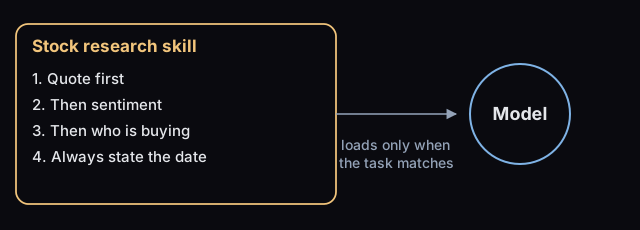
A written playbook for one kind of task: which tools to call, in what order, how to present the result. The model reads it only when your request matches. Claude, Codex, OpenClaw and Hermes load skills as files you can open and read; Meta Muse ships its own, built in.
In real life: a stock research skill says quote first, then sentiment, then who is buying, and always state the date.
7. Memory
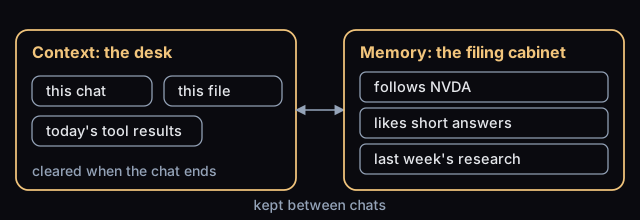
What the agent keeps between conversations: your preferences, facts it has learned, past work. Context is the desk; memory is the filing cabinet. An agent with memory remembers that you follow Nvidia and like short answers. One without starts from zero each time.
In real life: "remember that I only care about US stocks" goes into memory. The chat you are in right now is context.
8. The loop
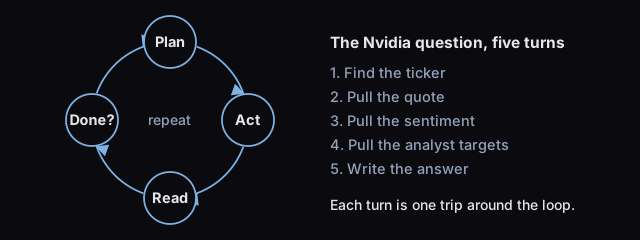
The loop is what turns a model into an agent. The model plans, picks a tool, reads the result and decides whether it is done or needs another step. Then it goes again. The software that runs the loop is sometimes called the harness.
In real life: the Nvidia question might take five turns: find the ticker, pull the quote, pull the sentiment, pull the analyst targets, write the answer.
9. Where market data comes in
Live data never lives inside the model. It enters through a tool or a connector at the moment of your question, with a date attached. Prices, sentiment, filings and earnings dates are the market data case; your calendar and your files are the everyday case.
In real life: without live data the model works from what it read in training. With a connector it gets the number and the time it was read. To give Claude or ChatGPT live stock data in a few clicks and no code, add the SentiSense connector, free to start.
Does the model matter?
More than most people assume. Two models given the same instructions, tools and data do different work: one checks the date on a number, the other does not; one takes six steps, the other stops at two. The strongest models a company offers are often called frontier models, meaning the current edge of what it can build, and the paid plan you already have usually includes one. On Claude, the free plan runs Sonnet and Haiku, and the $20 Pro plan adds Opus. On ChatGPT, OpenAI's help center lists GPT-6 Luna on the free plan, GPT-6 Sol on Plus and Pro, and GPT-6 Pro on the Pro plans.
The strongest model is rarely the default, so most people never try it on a real task. Pick the strongest model your plan allows, give it a real job, and compare the two answers. This is not a claim about which company's model is best. It is a claim that the model switch inside your own subscription is the cheapest upgrade you have.
Where does the agent run, and why does it change what it can do?
On your computer: the Claude and ChatGPT desktop apps run on your Mac or PC. Claude's desktop extensions connect it to your local files, and on paid plans its Chrome extension lets it navigate, click and fill forms in your own browser. ChatGPT's desktop app has a browser built in, can use local files and desktop apps with your permission where your plan allows it, and offers Computer Use as a plugin that asks before it touches each app. Gemini's Tasks can connect to the Chrome browser on your desktop or use a remote browser in the cloud.
In the cloud: Meta Muse, Grok Bot and Claude Duet each give the agent its own computer in a data center, so it keeps working while your laptop is closed. The trade is that websites can tell a data-center browser from a person's, and some turn it away. Anthropic says Claude Duet identifies itself with a distinct User-Agent header and published IP addresses so sites can decide how to treat it, and that some sites chose to block it. In September 2026 Amazon began blocking Muse from Amazon.com with a notice that an unauthorized AI agent violates its conditions of use.
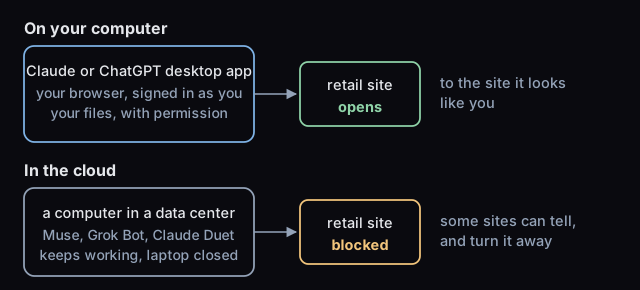
Ask a cloud agent to open a big retail site and that is the wall you tend to hit. The same request from an app on your own computer runs in your own browser, with the sites and sign-ins you already have, which is why it tends to go through.
Which AI agent is easiest to start with?
The one already inside an app you use. Claude, ChatGPT and Gemini are chat apps first, with agent features switched on by a setting or a plan, and they are getting more proactive: Claude Duet messages you when it is done or needs a decision, and Gemini's Tasks run on a schedule in the background. The Grok bot on X starts from a post: tag @bot and your Bot picks it up as a task. Meta Muse builds a custom connector from a short brief when a service is not on its list. Each takes minutes to set up. Guides: Meta Muse and your Grok bot.
Self-hosted agents are the other end. OpenClaw runs on your own hardware and meets you in the chat apps you already use; Hermes, from Nous Research, runs on your laptop or a $5 server and lets you use any model you want. You choose the model, write the instructions, pick the skills and own the memory. That control is the point, and the price is setup: a terminal, an installer, a config file, a process you keep running. Guides: OpenClaw, Claude Code, and the general guide for any agent.
Questions people ask
What are the 5 parts of an AI agent? Short lists use five: the model, instructions, context, tools and the loop. Connectors and skills are kinds of tools, and memory is context that survives between chats, so the five-part version and the nine-part diagram describe the same machine.
What is the difference between an AI agent and a chatbot? A chatbot answers from what the model already knows plus what you paste in. An agent can take actions through tools, read the results and go again before it answers. The loop is the difference.
What is MCP in plain English? MCP, the Model Context Protocol, is an open standard for connecting AI apps to outside systems. A service builds one MCP connector and it works in Claude, ChatGPT and the other apps that support the standard, so you add it once instead of once per app.
Do I need to code to use an AI agent? No. Claude, ChatGPT, Gemini, Meta Muse and the Grok bot on X are set up with settings and plain requests. Self-hosted agents such as OpenClaw and Hermes need a terminal for the install and a config file, which is where their extra control comes from.
Does an AI agent know today's stock prices? Not on its own. The model's knowledge stops at its training date. Live prices, sentiment and filings reach it through a connector or a tool at the moment you ask, with a date attached.
Bookmark this one: the vendors change their menus every few months, the parts do not. Product details were read on each vendor's own pages on October 27, 2026. Market data is provided for research and education, not investment advice.