How to Show Analyst Ratings and Price Targets in Your Product: Data, Display Rights and Cost
Put Wall Street analyst consensus, price-target bands and rating changes on your product's stock pages: the data from one API, the display rights per app type as the licensing terms state them, what it costs at the launch rate through December 31, 2026, attribution for 25% off, and a build brief with code your developer or contractor can take as is.

To show Wall Street analyst ratings on your product's stock pages, you need three things: the data (consensus, the price-target band and the rating changes, from one API), the right to display it to your users (a free or Pro key covers a free app; a product that charges or carries ads takes a Data License: Premium, $450 a month at the launch rate for subscriptions started by December 31, 2026), and a small build for whoever builds your product: one server-side route that makes two calls, and one card. Attribution is optional and takes 25% off.
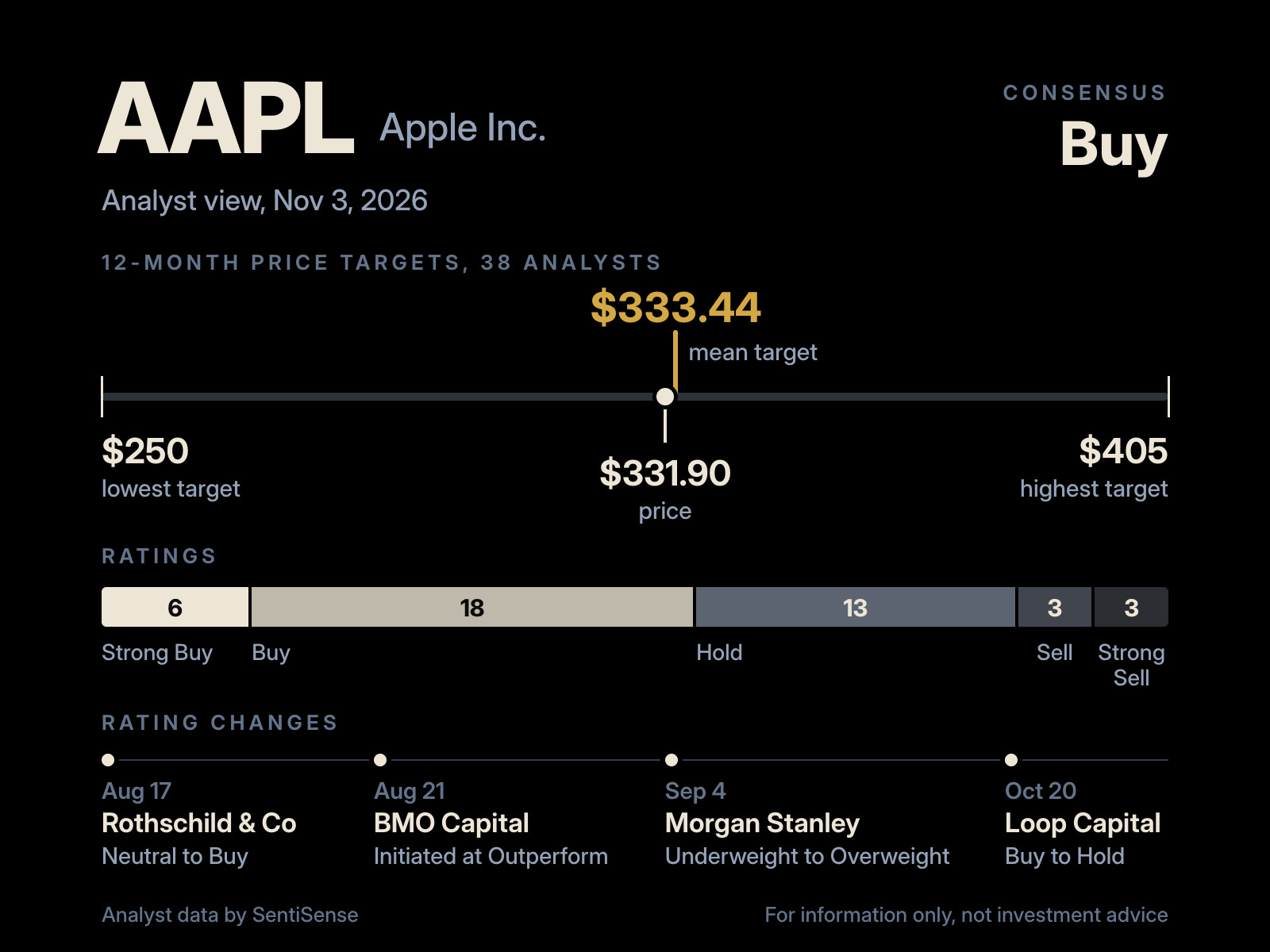
The card at the top of this page is what that build produces, rendered from the two responses below.
What goes on the page?
Two requests per ticker. The consensus is where the Street stands; the actions are how it got there.
curl -H "X-SentiSense-API-Key: $SENTISENSE_API_KEY" \
  "https://app.sentisense.ai/api/v1/analyst/AAPL/consensus"
The response on November 3, 2026, trimmed to the fields the card uses:
{
  "isPreview": false,
  "data": {
    "ticker": "AAPL", "companyName": "Apple Inc.", "currentPrice": 331.9,
    "targetLow": 250.0, "targetMean": 333.4384, "targetMedian": 340.0, "targetHigh": 405.0,
    "numberOfAnalysts": 38, "upsidePercent": 0.46, "consensusLabel": "BUY",
    "strongBuy": 6, "buy": 18, "hold": 13, "sell": 3, "strongSell": 3,
    "updatedAt": "2026-11-03T23:37:56Z"
  }
}
currentPrice is the reference price captured with the snapshot, not a live quote. numberOfAnalysts counts the analysts behind the targets, a separate group from the five rating counts. Analyst data refreshes about once a day across the covered universe, so the card shows updatedAt. On a free key, checked on November 3, 2026, AAPL came back as a preview: isPreview: true with the band, the analyst count, the label and the stamp, targetMedian null and the five counts at 0. TSLA, one of the sample companies, came back in full with sampleCompany: true. Pro returns the full response on every covered stock, and a Data License includes every Pro feature.
curl -H "X-SentiSense-API-Key: $SENTISENSE_API_KEY" \
  "https://app.sentisense.ai/api/v1/analyst/AAPL/actions?lookbackDays=90"
{
  "isPreview": false,
  "data": [
    { "actionDate": "2026-11-03", "firm": "UBS", "actionType": "REITERATE", "fromGrade": "Neutral", "toGrade": "Neutral" },
    { "actionDate": "2026-11-03", "firm": "TD Cowen", "actionType": "REITERATE", "fromGrade": "Buy", "toGrade": "Buy" },
    { "actionDate": "2026-11-03", "firm": "Rosenblatt", "actionType": "REITERATE", "fromGrade": "Neutral", "toGrade": "Neutral" }
  ]
}
Newest first, and mostly reiterations: 41 of the 47 rows in this window, a little above the roughly 83% of actions across the market that confirm a rating rather than change it. Keeping UPGRADE, DOWNGRADE and INITIATE gives the card's list (Loop Capital to Hold on October 20, Morgan Stanley to Overweight on September 4). On the same free key, AAPL returned the three newest rows, with totalCount still counting the whole window, and TSLA returned every row; Pro and the licenses return the whole window on every covered stock. The feed also carries forward EPS and revenue estimates with the surprise history, who covers each stock by firm and named analyst, and a daily consensus history; every field is in the Analyst Ratings API reference.
Do you need a license to display it?
The API Terms and the Data License Agreement answer this per product, and the answer turns on whether yours is a Paid Product: one that charges for access, or earns revenue from advertising, sponsorship or affiliate referrals, its free tiers included.
| Your product | What a key lets you show | Where it says so |
|---|---|---|
| Your own research, or tools your team uses internally | Everything the API returns, on a free or Pro key. | API Terms 3.1(a) |
| A free app with no subscriptions, ads, sponsorship or affiliate revenue, a free invite-only beta included | SentiSense data as delivered, "for example analyst consensus and price targets shown alongside the Consumer's own metrics", as part of the app's broader analysis; not a standalone analyst-data service, and not through an API, feed, file export or dataset. | API Terms 4.2(h) |
| A paid product, or one that carries ads | Your own analytical outputs built from the data. Showing the data as delivered, ratings, price targets and values included, needs a Data License or an Enterprise agreement (a product already showing it before October 29, 2026 has until January 1, 2027). | API Terms 4.1(j), 4.2(c) |
| Data License: Premium | Display inside your application, including in analyst-rating and price-target features, commercially, with storage for as long as the product needs. Analyst ratings, price targets and consensus estimates are third-party data: they can sit on a stock page, a screener or a report beside your own analysis or other licensed data, "except in a product or feature whose main purpose is to let end users look up that data, such as a stock quote page, an analyst-ratings lookup, or an estimates page." | Data License 4.1, 4.3, 4.5(a), Schedule 1 |
Two things hold on every plan. Attribution is optional: a Data License is 25% cheaper for each billing period in which "Powered by SentiSense", linked to sentisense.ai, appears on or near the licensed data. And a product that displays SentiSense data to end users carries a disclaimer substantially similar to "Sentiment data and analytics provided by SentiSense are for informational purposes only and do not constitute financial advice. Do not make investment decisions based solely on this data." The card above carries a short form of it.
What does it cost?
Data License: Premium lists at $1,000 a month and is $450 a month at the launch rate, 55% off, for subscriptions started by December 31, 2026, kept for as long as the subscription stays continuously active; with attribution it is $337.50. It is month to month, cancelled from account settings, self-serve through the business plans on the pricing page, and it includes every Pro feature at 2,000 requests a minute with no monthly cap. An existing Pro subscription switches in place, prorated from the day of the switch. Checkout asks for the name or URL of the product the license covers and for acceptance of the agreement; the version you accepted is recorded. The plans are described in the data license announcement, and how display rights compare across vendors is in market data API commercial use.
Prices as of November 3, 2026. Build on a free key first: the endpoints are the same ones the license covers, and on a sample company such as TSLA a free key returns every field the card uses, so your developer can have the card working before you buy.
Hand this to your developer (or your contractor)
Everything from here down is the build brief. The shape is the same on every stack: the browser calls a route you own, the route reads the key from the environment and calls SentiSense, and only the fields the card needs come back. A key in client code is visible to anyone who opens the developer tools. The key comes from sentisense.ai/get-api-key, free, no card required.
Lovable. Add the key under More, Settings, Secrets, named SENTISENSE_API_KEY, or paste it into the chat when Lovable asks for it. Describe the feature in the chat and Lovable writes and deploys an edge function that reads it with Deno.env.get("SENTISENSE_API_KEY"). Secrets are "injected into your Edge Functions automatically, and never reach the browser"; anything prefixed VITE_ is a browser-exposed build value. (Lovable docs: Secrets)
v0. Add SENTISENSE_API_KEY under Project menu, Settings, Environment Variables, and tick Development so the preview can read it. Ask for a Route Handler at app/api/analyst/[ticker]/route.ts that reads process.env.SENTISENSE_API_KEY. No NEXT_PUBLIC_ prefix: "Non-NEXT_PUBLIC_ environment variables are only available in the Node.js environment, meaning they aren't accessible to the browser." (v0 docs: External APIs)
Replit. Add the key under Tools, Setup, Secrets, and read it in the backend as an environment variable (process.env.SENTISENSE_API_KEY in Node, os.environ["SENTISENSE_API_KEY"] in Python); Replit's security checklist puts it as "API credentials should always remain server-side." Before publishing, enter the key again under Publishing, Adjust settings, Production app secrets, because "Secrets you set in the Project Editor do not automatically carry over to your published app", and publish as Autoscale or Reserved VM: a Static deployment gets no secrets. (Replit docs: Secrets)
The route is about twenty lines. This is the v0 version; the Lovable function and the Replit handler are the same body with the environment read swapped:
// app/api/analyst/[ticker]/route.ts (Next.js 15 or later)
const BASE = "https://app.sentisense.ai/api/v1/analyst";

export async function GET(_req: Request, { params }: { params: Promise<{ ticker: string }> }) {
  const { ticker } = await params;
  const headers = { "X-SentiSense-API-Key": process.env.SENTISENSE_API_KEY ?? "" };
  const t = ticker.toUpperCase();
  const [c, a] = await Promise.all([
    fetch(`${BASE}/${t}/consensus`, { headers }),
    fetch(`${BASE}/${t}/actions?lookbackDays=90`, { headers }),
  ]);
  if (c.status === 404) return Response.json({ covered: false }, { status: 404 });
  const consensus = (await c.json()).data;
  const actions = ((await a.json()).data as Array<{ actionType: string }>)
    .filter((r) => r.actionType !== "REITERATE")
    .slice(0, 5);
  return Response.json({ covered: true, consensus, actions });
}
A 404 from the consensus call means no analyst coverage for that symbol, not a transient error: it answers the same way until the symbol joins the covered list, and it counts toward the quota, so do not retry it. Coverage is about 1,000 of the most-watched US stocks, the list GET /api/v1/stocks returns. An ETF answers 404 ticker_is_etf with a pointer to the fund's holdings-weighted analyst aggregate. The SDKs wrap both calls: client.analyst.consensus("AAPL") and client.analyst.actions("AAPL", { lookbackDays: 90 }) in Node (npm install sentisense), get_analyst_consensus and get_analyst_actions in Python (pip install sentisense).
The prompt to paste into Lovable, v0, Replit or a coding agent:
Add an "Analyst view" card to the stock page. Create a server-side route /api/analyst/[ticker] that reads SENTISENSE_API_KEY from the environment (never in client code) and calls GET https://app.sentisense.ai/api/v1/analyst/{ticker}/consensus and GET https://app.sentisense.ai/api/v1/analyst/{ticker}/actions?lookbackDays=90 with the header X-SentiSense-API-Key. Return consensus.data (targetLow, targetMean, targetHigh, currentPrice, numberOfAnalysts, consensusLabel, strongBuy, buy, hold, sell, strongSell, updatedAt) and the first five actions whose actionType is not REITERATE. Treat a 404 as "no analyst coverage" and show that text instead of the card.

Render: the ticker and consensusLabel; a horizontal band from targetLow to targetHigh with markers at targetMean (accent color) and currentPrice; "N analysts with a price target" and the updatedAt date; a stacked bar of the five rating counts with a legend; the rating changes as "date, action, firm, fromGrade to toGrade" (omit fromGrade when null). Footer: "Analyst data by SentiSense. For information only, not investment advice." Use the page's existing styling, no gradients.
What a price target is and how to read the spread: what is a price target for a stock. The Street's view set against news and social sentiment on the same page: how to track analyst ratings with an API. Every firm on a stock: the analyst coverage API.
Analyst data is for research and information, not investment advice.